> ## Documentation Index
> Fetch the complete documentation index at: https://docs.remyx.ai/llms.txt
> Use this file to discover all available pages before exploring further.
# Agents
> Autonomous workers on your repos: set up, run, pause — and drill into each agent's runs, direction, and evidence
**Nav:** Agents | **URL:** [`/agents`](https://studio.remyx.ai/agents)
An **agent** is an autonomous worker installed on one repo. It does a job on a schedule, reports evidence for everything it does, and holds the calls a human should make for your [Inbox](/platform/review/inbox). **Outrider** — a GitHub Action that turns recent research into draft PRs — is the first flagship agent; more agents with other functions are coming.
The Agents view is the fleet index — every repo you've installed on, its state, and its last outcome — with **+ Set up an agent** to add another. Click any agent to open its report.
***
## Set up an agent
Click **+ Set up an agent**. The setup wizard is the in-app twin of `remyxai outrider init`:
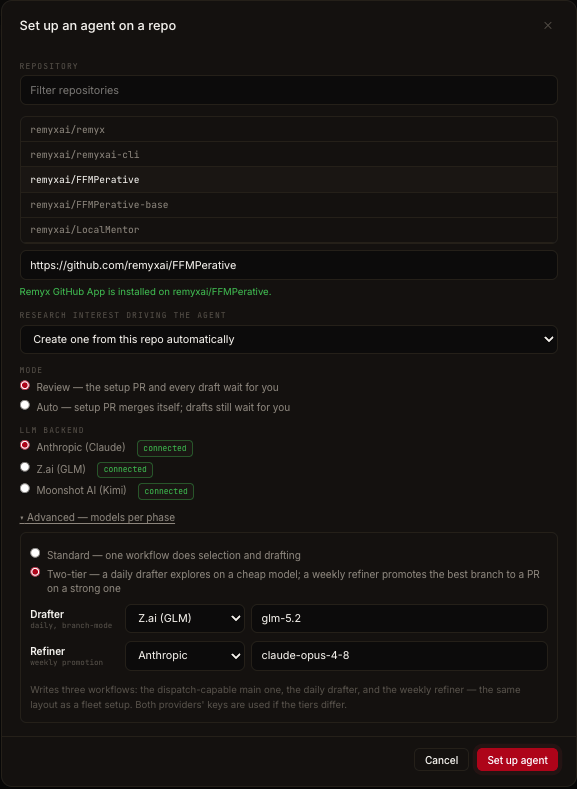 Pick from your GitHub repos or paste a URL. The wizard preflights the **Remyx GitHub App** on that repo — the App is how agents author PRs and Issues as **remyx\[bot]** (without it they'd come from `github-actions[bot]`). If it's missing, the wizard shows the one-click install link and unlocks automatically once GitHub records it.
**Create one from this repo automatically** (the default — Remyx derives the interest from the repo's code and history) or pick an existing active interest.
* **Review** — the setup PR and every draft wait for you.
* **Auto** — the setup PR merges itself; drafts still wait for you.
**Anthropic (Claude)**, **Z.ai (GLM)**, or **Moonshot AI (Kimi)** — the wizard preselects a connected provider and flags one that isn't connected yet. Under **Advanced — models per phase** you can choose the [two-tier drafter/refiner layout](/platform/agents/backends#the-two-tier-drafter-refiner-pattern).
Provisioning issues the repo a scoped **agent key** (`rmxa_`), writes the workflow file, and opens a bot-authored **setup PR** — merge it (or let Auto mode merge it) to activate the agent.
```bash From the terminal theme={null}
remyxai outrider init --repo owner/name --auto-interest --mode review
```
***
## Provisioning states
Each agent row shows its status chip, inline **Run now** / **Pause** actions, and its last outcome:
Pick from your GitHub repos or paste a URL. The wizard preflights the **Remyx GitHub App** on that repo — the App is how agents author PRs and Issues as **remyx\[bot]** (without it they'd come from `github-actions[bot]`). If it's missing, the wizard shows the one-click install link and unlocks automatically once GitHub records it.
**Create one from this repo automatically** (the default — Remyx derives the interest from the repo's code and history) or pick an existing active interest.
* **Review** — the setup PR and every draft wait for you.
* **Auto** — the setup PR merges itself; drafts still wait for you.
**Anthropic (Claude)**, **Z.ai (GLM)**, or **Moonshot AI (Kimi)** — the wizard preselects a connected provider and flags one that isn't connected yet. Under **Advanced — models per phase** you can choose the [two-tier drafter/refiner layout](/platform/agents/backends#the-two-tier-drafter-refiner-pattern).
Provisioning issues the repo a scoped **agent key** (`rmxa_`), writes the workflow file, and opens a bot-authored **setup PR** — merge it (or let Auto mode merge it) to activate the agent.
```bash From the terminal theme={null}
remyxai outrider init --repo owner/name --auto-interest --mode review
```
***
## Provisioning states
Each agent row shows its status chip, inline **Run now** / **Pause** actions, and its last outcome:
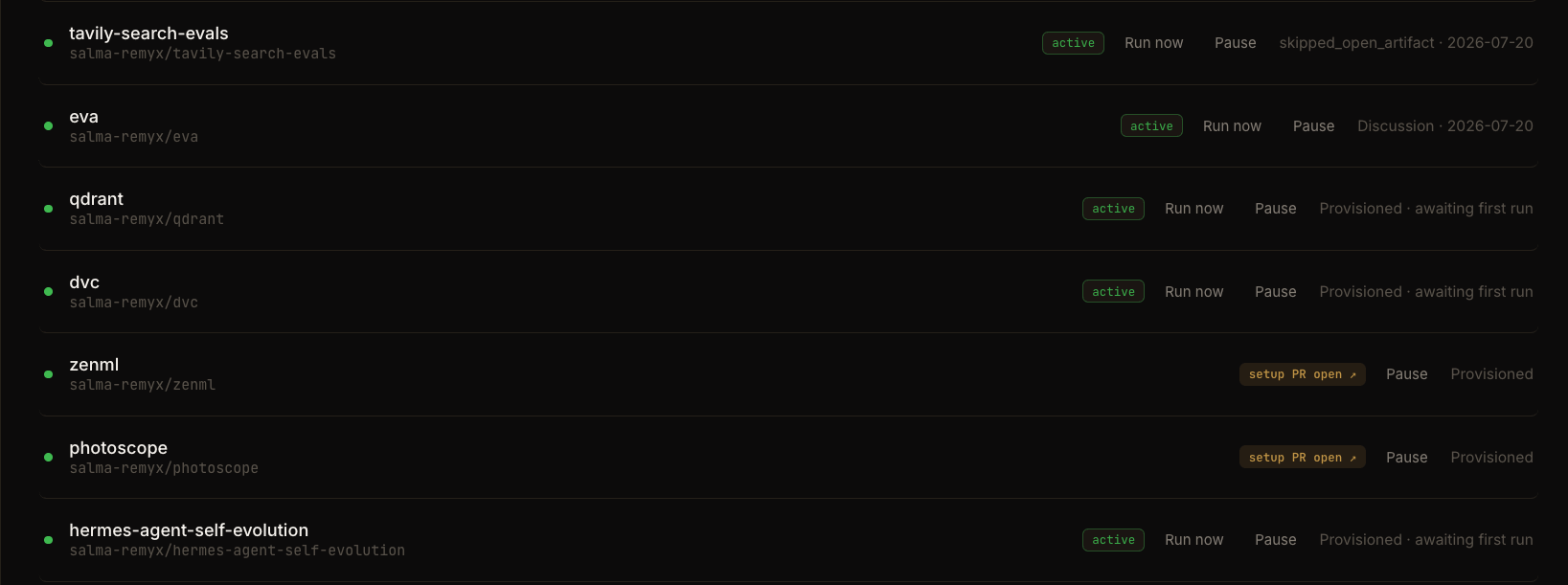 The chip is derived the same way the CLI's preflights reason about it:
| State | Meaning | What to do |
| ---------------------- | -------------------------------------------------- | ----------------------------------------------------------------------- |
| **setup PR open** | The bot-authored setup PR hasn't been merged | Merge the PR (the chip links to it) |
| **needs model key** | No model-provider key is connected for its backend | Connect the provider under [Connectors](/platform/configure/connectors) |
| **awaiting first run** | Provisioned, no run dispatched yet | **Run now**, or wait for the schedule |
| **active** | Running on its schedule | Nothing — review its drafts in the [Inbox](/platform/review/inbox) |
| **paused** | Its key is revoked; the next run stops immediately | **Resume** re-provisions with a fresh key |
## Run now / Pause
* **Run now** dispatches a one-shot run outside the schedule. Available once the setup PR is merged and the agent isn't paused.
* **Pause** revokes the agent's key: the next run fails auth immediately. The workflow file stays in the repo; nothing else is touched. Resuming is a fresh re-provisioning (new key, new setup PR). Pausing here, revoking the agent key under [Account](/platform/configure/account#agent-keys), and the MCP `pause_agent` tool all do the same thing.
```bash From the terminal theme={null}
remyxai outrider trigger --repo owner/name
```
***
## The agent report
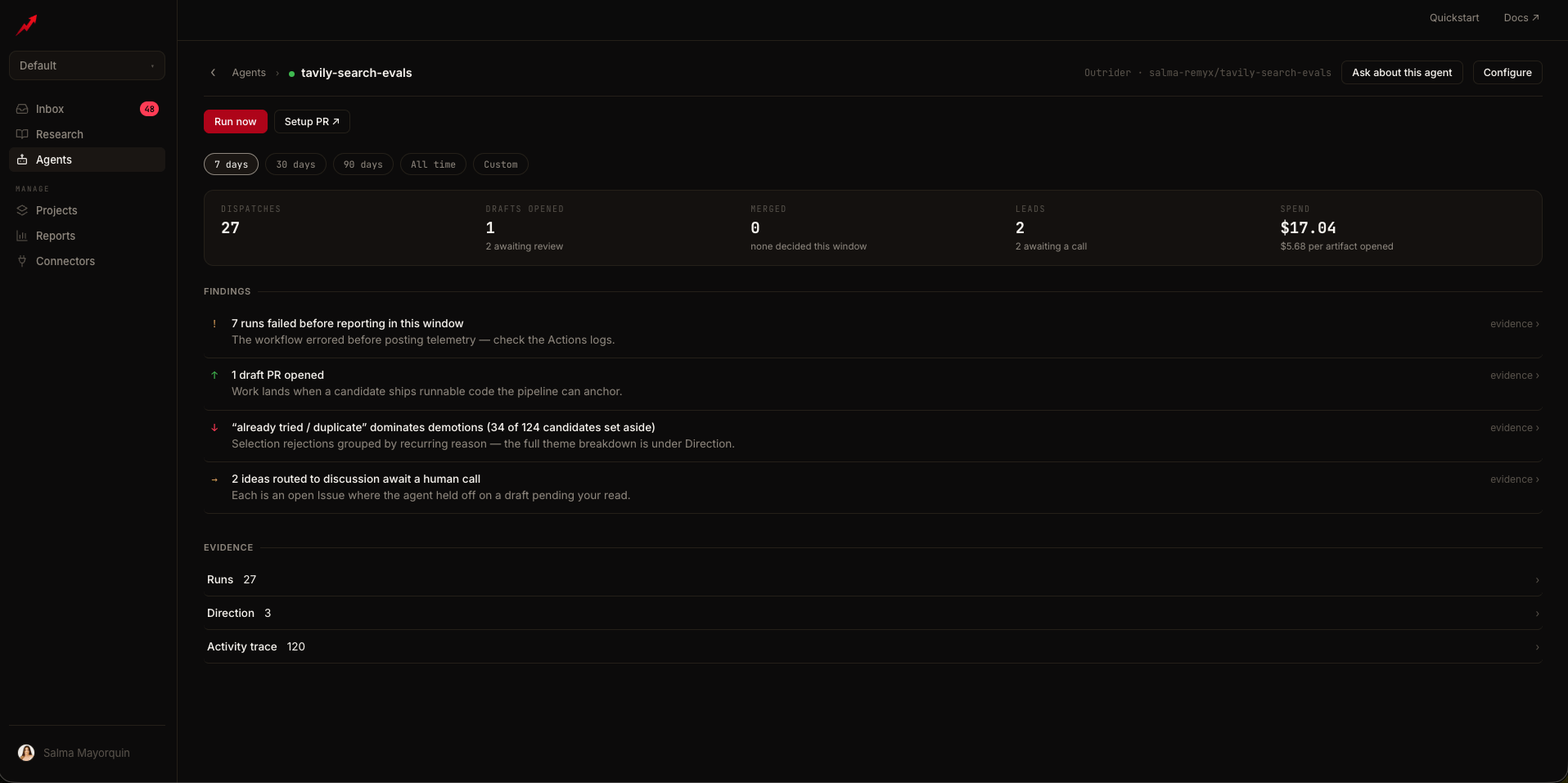
Click an agent to open its report at `/agents/`. It leads with a KPI strip and **Findings** — each finding deep-links into the evidence it came from — over a shared **date window** (default last 7 days, presets up to All time) that rides the URL, so any view is shareable. Two header buttons: **Ask about this agent** and **Configure**. Anything blocking the agent is a banner up front; healthy agents get **Run now**.
The chip is derived the same way the CLI's preflights reason about it:
| State | Meaning | What to do |
| ---------------------- | -------------------------------------------------- | ----------------------------------------------------------------------- |
| **setup PR open** | The bot-authored setup PR hasn't been merged | Merge the PR (the chip links to it) |
| **needs model key** | No model-provider key is connected for its backend | Connect the provider under [Connectors](/platform/configure/connectors) |
| **awaiting first run** | Provisioned, no run dispatched yet | **Run now**, or wait for the schedule |
| **active** | Running on its schedule | Nothing — review its drafts in the [Inbox](/platform/review/inbox) |
| **paused** | Its key is revoked; the next run stops immediately | **Resume** re-provisions with a fresh key |
## Run now / Pause
* **Run now** dispatches a one-shot run outside the schedule. Available once the setup PR is merged and the agent isn't paused.
* **Pause** revokes the agent's key: the next run fails auth immediately. The workflow file stays in the repo; nothing else is touched. Resuming is a fresh re-provisioning (new key, new setup PR). Pausing here, revoking the agent key under [Account](/platform/configure/account#agent-keys), and the MCP `pause_agent` tool all do the same thing.
```bash From the terminal theme={null}
remyxai outrider trigger --repo owner/name
```
***
## The agent report
Click an agent to open its report at `/agents/`. It leads with a KPI strip and **Findings** — each finding deep-links into the evidence it came from — over a shared **date window** (default last 7 days, presets up to All time) that rides the URL, so any view is shareable. Two header buttons: **Ask about this agent** and **Configure**. Anything blocking the agent is a banner up front; healthy agents get **Run now**.
 ### Runs
Every run the agent has reported, in weekly rollups, filterable by outcome and searchable by title, arXiv id, or status:
| Outcome | Meaning |
| -------------- | ------------------------------------------------------------------------------ |
| **Draft PR** | The run opened a draft pull request |
| **Discussion** | The run opened an Issue — relevant, but safer to discuss first |
| **Branch** | The run pushed a draft branch; refinement promotes it to a PR |
| **Failed** | The run errored — see **Analyze** |
| **Skipped** | The run held publication (low confidence, cadence guard, no structural fit, …) |
Each row shows the artifacts, the run's **cost**, and an **Analyze ›** action that pulls the run's job log and returns a root-cause read with a suggested next step.
### Direction
What the agent has learned from your decisions. Every merge, skip, and discussion re-weights what it proposes next:
| Marker | Meaning |
| -------------- | ------------------------------------------------- |
| **↑ Promoted** | A preference your merges have strengthened |
| **↓ Demoted** | A direction your skips and closures have weakened |
| **→ Held** | Signal exists but isn't decisive yet |
Each direction is evidence-backed — expand it to see the specific PRs, Issues, and runs it was learned from.
### Activity trace
The agent's event stream, grouped by week: **Merged**, **Closed**, **Drafts**, **Discussed**, **Failed runs**, **Skipped** — each event linked to its artifact, with skip reasons attached.
### Configuration
The agent's operating setup, editable in place: repository, interest, workflow file, setup PR, **model backend** (changing it re-provisions with a fresh setup PR), and status with **Pause** / **Resume**. The **Signal** panel lists what feeds this agent's decisions: GitHub merge history (the ranking baseline), the repo's [research brief](/platform/discover/briefs), validation runs, Linear tickets (interfaces under active work route risky candidates to discussion), and — when connected — A/B ship-rate feedback.
### Ask about this agent
A chat drawer grounded in the agent's real data — runs, telemetry, failing-run log tails, open artifacts, direction — via read-only tools. It explains; actions like triggering or pausing stay behind the app's confirm-gated buttons. [Inbox](/platform/review/inbox) **Ask** links land in this same drawer, focused on the relevant run.
***
## Where agents surface elsewhere
* The fleet rolls up in [Reports](/platform/review/reports); items needing you land in the [Inbox](/platform/review/inbox).
* An agent can belong to several [Projects](/platform/configure/projects) — link it under the project's **Agents** section.
* The full fleet is scriptable via the [MCP tool plane](/resources/mcp-server#outrider-fleet-tools) and the [REST API](/api-reference/api-reference#outrider-agents).
***
## Related
What actually runs in the repo's GitHub Actions
Anthropic / Z.ai / Moonshot, and the two-tier pattern
Where an agent's drafts and held calls wait for you
The fleet in one view
### Runs
Every run the agent has reported, in weekly rollups, filterable by outcome and searchable by title, arXiv id, or status:
| Outcome | Meaning |
| -------------- | ------------------------------------------------------------------------------ |
| **Draft PR** | The run opened a draft pull request |
| **Discussion** | The run opened an Issue — relevant, but safer to discuss first |
| **Branch** | The run pushed a draft branch; refinement promotes it to a PR |
| **Failed** | The run errored — see **Analyze** |
| **Skipped** | The run held publication (low confidence, cadence guard, no structural fit, …) |
Each row shows the artifacts, the run's **cost**, and an **Analyze ›** action that pulls the run's job log and returns a root-cause read with a suggested next step.
### Direction
What the agent has learned from your decisions. Every merge, skip, and discussion re-weights what it proposes next:
| Marker | Meaning |
| -------------- | ------------------------------------------------- |
| **↑ Promoted** | A preference your merges have strengthened |
| **↓ Demoted** | A direction your skips and closures have weakened |
| **→ Held** | Signal exists but isn't decisive yet |
Each direction is evidence-backed — expand it to see the specific PRs, Issues, and runs it was learned from.
### Activity trace
The agent's event stream, grouped by week: **Merged**, **Closed**, **Drafts**, **Discussed**, **Failed runs**, **Skipped** — each event linked to its artifact, with skip reasons attached.
### Configuration
The agent's operating setup, editable in place: repository, interest, workflow file, setup PR, **model backend** (changing it re-provisions with a fresh setup PR), and status with **Pause** / **Resume**. The **Signal** panel lists what feeds this agent's decisions: GitHub merge history (the ranking baseline), the repo's [research brief](/platform/discover/briefs), validation runs, Linear tickets (interfaces under active work route risky candidates to discussion), and — when connected — A/B ship-rate feedback.
### Ask about this agent
A chat drawer grounded in the agent's real data — runs, telemetry, failing-run log tails, open artifacts, direction — via read-only tools. It explains; actions like triggering or pausing stay behind the app's confirm-gated buttons. [Inbox](/platform/review/inbox) **Ask** links land in this same drawer, focused on the relevant run.
***
## Where agents surface elsewhere
* The fleet rolls up in [Reports](/platform/review/reports); items needing you land in the [Inbox](/platform/review/inbox).
* An agent can belong to several [Projects](/platform/configure/projects) — link it under the project's **Agents** section.
* The full fleet is scriptable via the [MCP tool plane](/resources/mcp-server#outrider-fleet-tools) and the [REST API](/api-reference/api-reference#outrider-agents).
***
## Related
What actually runs in the repo's GitHub Actions
Anthropic / Z.ai / Moonshot, and the two-tier pattern
Where an agent's drafts and held calls wait for you
The fleet in one view