
Every AI practitioner has a backlog of things they want to try. New techniques, new approaches, ideas that could meaningfully improve what they’re building. Most of it never gets evaluated because there is simply too much to track across too many sources. Remyx AI narrows that search space by ranking new resources daily against your team’s Research Interests and surfacing the highest-potential ideas for your use case. This tutorial connects Remyx to OpenClaw so that shortlist lands in your team’s Slack every weekday morning. Spend less time searching and more time running experiments on ideas that are worth exploring.Documentation Index
Fetch the complete documentation index at: https://docs.remyx.ai/llms.txt
Use this file to discover all available pages before exploring further.
What this sets up
An OpenClaw skill that runsremyxai papers digest, formats a Slack digest grouped by Research Interest, and posts to #research every weekday at 9 AM PT via a scheduled cron job.
Starting point: OpenClaw is already installed and running on your machine. You have not yet connected Slack or installed the Remyx skill.
Step 1: Install the remyxai CLI
Install theremyxai CLI system-wide so OpenClaw can find the binary. OpenClaw’s exec tool uses the system PATH, so the binary must be in /usr/local/bin — not ~/.local/bin.
Step 2: Create Your Research Interests
Research Interests tell Remyx what to track. Each one has a name, a natural-language description, links (huggingface, github, blogs, etc) of what you care about, and a daily recommendation count.Step 3: Install OpenClaw and Connect Slack
If you want to share your recommended papers via Slack, you can configure it during the OpenClaw onboarding wizard. Run the installer and follow the prompts.3.1 Run the installer
3.2 Choose your LLM provider
Select your provider of choice and enter your API key.3.3 Create a Slack App
OpenClaw connects to Slack via Socket Mode. You’ll need two tokens. Here’s how to get them:- Go to api.slack.com/apps and click Create New App → From scratch
- Name it (e.g.
Remyx OpenClaw) and select your workspace - Click OAuth & Permissions in the sidebar. Scroll to Bot Token Scopes and add:
chat:write,channels:read,app_mentions:read - Click Socket Mode in the sidebar and toggle it On. Create an App-Level Token named
openclaw-socket. Copy thexapp-token - Click Event Subscriptions and toggle On. Add
app_mentionandmessage.channelsunder bot events - Click Install App → Install to Workspace. Copy the Bot User OAuth Token (
xoxb-)
3.4 Enter tokens in OpenClaw wizard
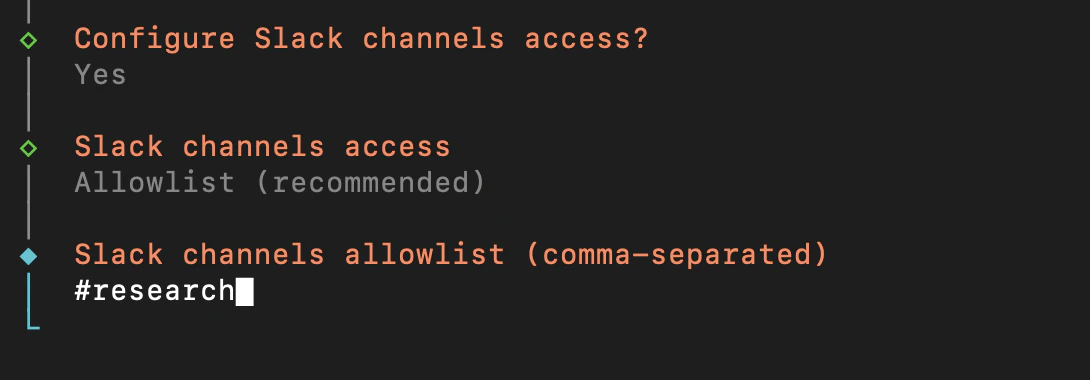
The installer will ask you to select a channel. Select Slack, name your bot, then enter: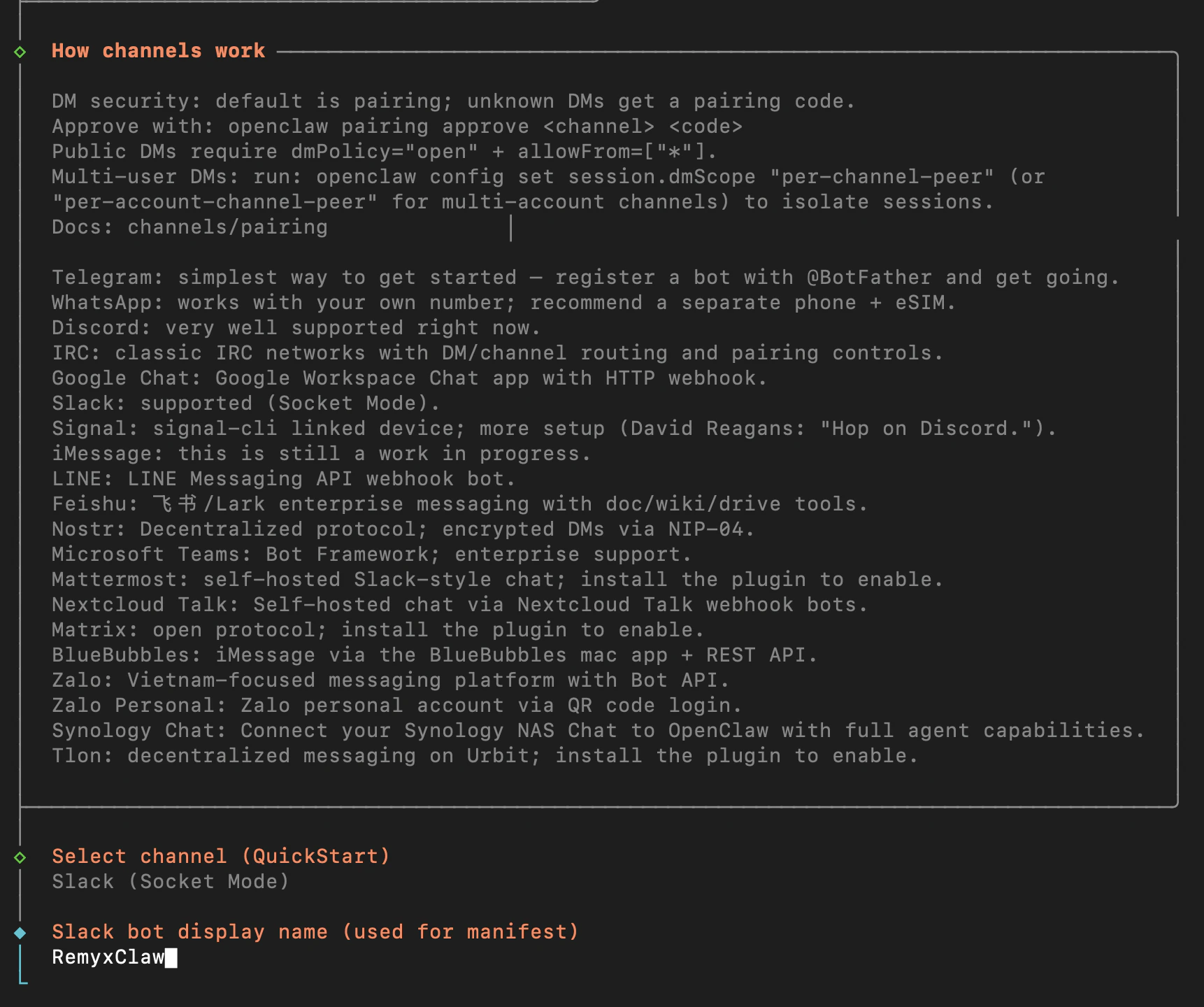
#research. Skip skills for now.
3.5 Invite the bot to #research
In Slack, open#research and type:
3.6 Disable the bundled Slack skill
OpenClaw ships a bundled slack skill that tries to exec aslack CLI binary. This conflicts with the native Slack integration. Disable it:
Why disable the bundled slack skill?Without this, the agent tries to run
slack sendMessage ... as a shell command. That binary doesn’t exist, so all Slack posts fail. Disabling it forces the agent to use OpenClaw’s native message tool instead.3.7 Test Slack is working
Start the TUI and send a test message: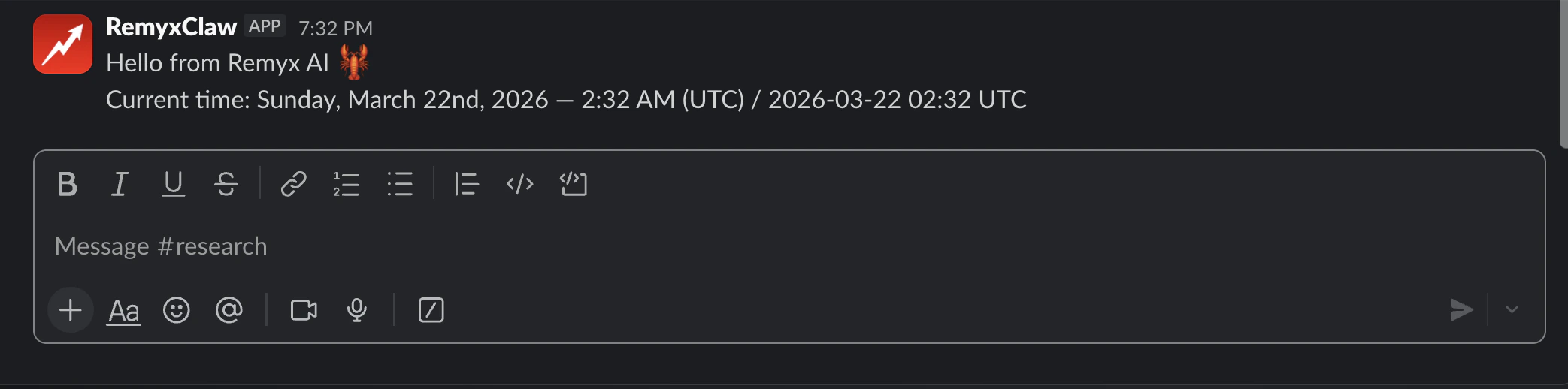
Step 4: Install the Remyx Skill
4.1 Find your workspace path
~/.openclaw/workspace. Use whatever this returns in the steps below.
4.2 Create the skill directory and copy SKILL.md
The
skills/ directory doesn’t exist by defaultmkdir -p creates the full path including the skills/ directory. Skipping this step causes No such file or directory when copying. The skill name in the directory must match the name: field in SKILL.md. Our SKILL.md has name: remyx, so the directory must be skills/remyx/.4.3 Set REMYXAI_API_KEY
The skill usesrequires.env to check for this key — it must be in OpenClaw’s config env, not just your shell.
Where to find your API keyLog in to remyx.ai → Account Settings → API Keys → Create new key. Use the view button to see and copy the full token.
4.4 Restart the gateway
4.5 Verify the skill is eligible
REMYXAI_API_KEY, the key is under the wrong namespace. Verify:
Step 5: Trigger a Manual Run
Before scheduling the cron, confirm the full pipeline works end-to-end.5.1 Make sure you have recommendations
5.2 Test the skill in the TUI
In the OpenClaw TUI say: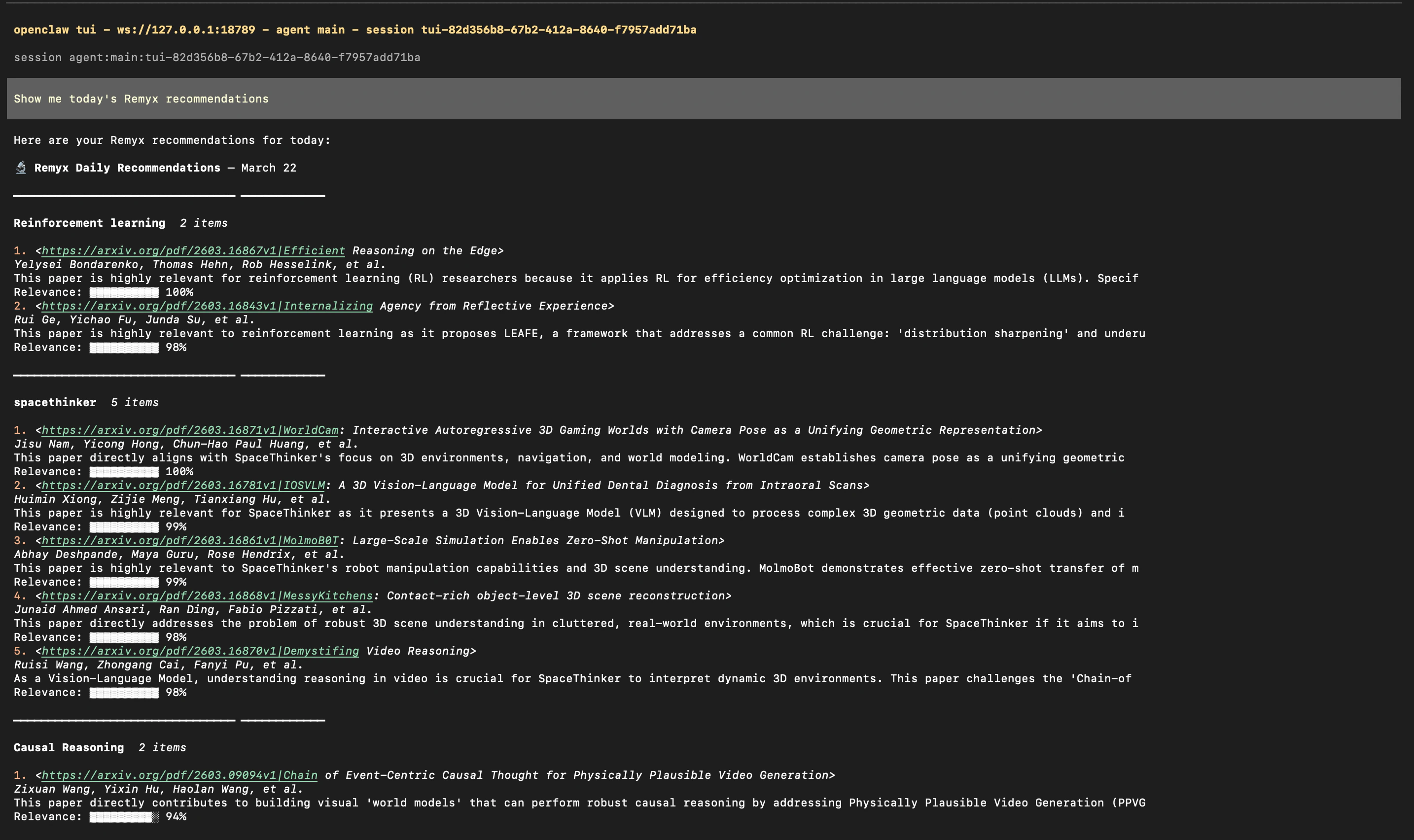
remyxai papers digest and display the formatted digest in chat. Then test posting to Slack:
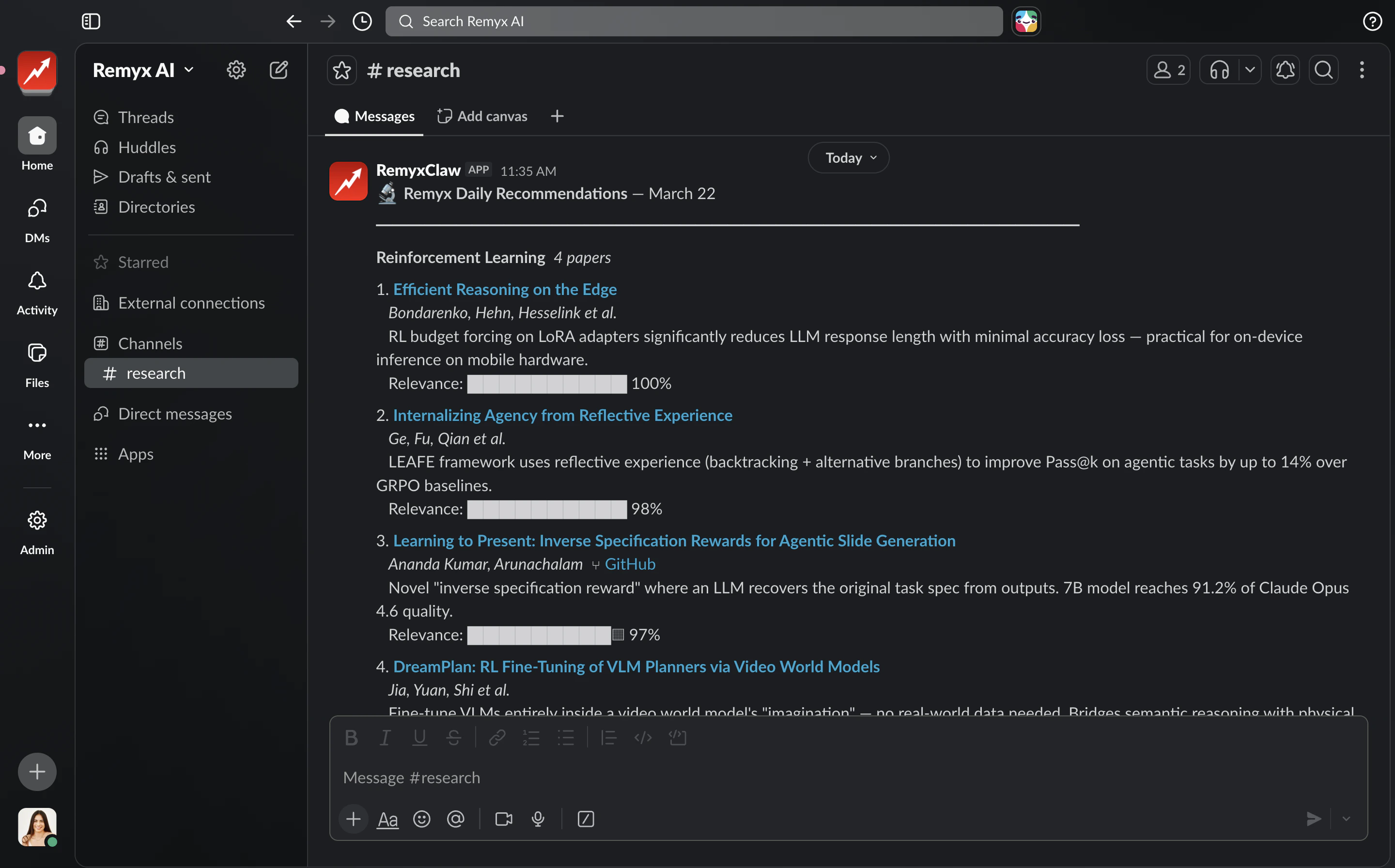
Digest shows ‘no new recommendations today’?Run
remyxai papers refresh --wait to trigger a fresh ranking or view more results. If papers show for period=week but not today, recommendations were generated on a previous day. Refresh will present the latest papers as alerted for today.Step 6: Set Up the Daily Cron
Schedule the skill to post every weekday at 9 AM PT.Option A — Tell your agent (recommended)
In the TUI just say:
SKILL.md and runs the openclaw cron add command automatically.
Option B — Run directly
Verify and test immediately
Troubleshooting
Gateway crashes on startup
Gateway crashes on startup
Check the logs:If you see
invalid_auth: your Slack tokens are wrong or swapped. Re-enter them:Skill shows eligible: False / missing config: REMYXAI_API_KEY
Skill shows eligible: False / missing config: REMYXAI_API_KEY
The key is under the wrong namespace. The skill uses
requires.env, not requires.config. Fix:remyxai papers command not found
remyxai papers command not found
The wrong Python installed the package. Wipe and reinstall using the exact Python the binary will use:
Agent tries to exec a 'slack' CLI binary instead of posting natively
Agent tries to exec a 'slack' CLI binary instead of posting natively
The bundled slack skill is enabled. Disable it:
Gateway token mismatch on startup
Gateway token mismatch on startup
Quick Reference
| Intent | Command |
|---|---|
| Get today’s digest | remyxai papers digest --period today --format json |
| Get last week’s digest | remyxai papers digest --period week |
| Papers for one interest | remyxai papers list --interest "Reinforcement Learning" --period today |
| Refresh all interests | remyxai papers refresh --wait |
| Refresh one interest | remyxai papers refresh --interest "Reinforcement Learning" --wait |
| List interests | remyxai interests list |
| Create an interest | remyxai interests create --name '...' --context '...' |
| Pause/resume an interest | remyxai interests toggle --interest "Reinforcement Learning" |
| Pause the cron | openclaw cron edit <job-id> --disable |
| Resume the cron | openclaw cron edit <job-id> --enable |
| Change cron to 8 AM | openclaw cron edit <job-id> --cron "0 8 * * 1-5" |
| Run cron immediately | openclaw cron run <job-id> |
| Check run history | openclaw cron runs --id <job-id> --limit 5 |
| Check gateway logs | journalctl --user -u openclaw-gateway.service -n 50 --no-pager |
| Check skill eligibility | openclaw skills list --json 2>/dev/null | grep -A5 remyx |