
/agents
An agent is an autonomous worker installed on one repo. It does a job on a schedule, reports evidence for everything it does, and holds the calls a human should make for your Inbox. Outrider, a GitHub Action that turns recent research into draft PRs, is the first flagship agent; more agents with other functions are coming.
The Agents view is the fleet index: every repo you’ve installed on, its state, and its last outcome, with + Set up an agent to add another. Click any agent to open its report.
Set up an agent
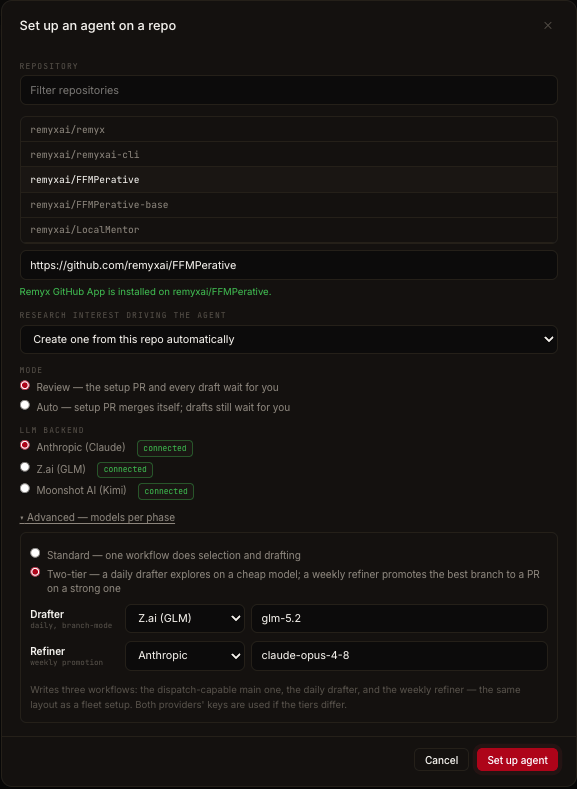
Click + Set up an agent. The setup wizard is the in-app twin ofremyxai outrider init:
1
Repository
Pick from your GitHub repos or paste a URL. The wizard preflights the Remyx GitHub App on that repo — the App is how agents author PRs and Issues as remyx[bot] (without it they’d come from
github-actions[bot]). If it’s missing, the wizard shows the one-click install link and unlocks automatically once GitHub records it.2
Research interest driving the agent
Create one from this repo automatically (the default — Remyx derives the interest from the repo’s code and history) or pick an existing active interest.
3
Mode
- Review — the setup PR and every draft wait for you.
- Auto — the setup PR merges itself; drafts still wait for you.
4
Coding agent and model backend
Two independent choices. The coding agent is the CLI that writes the implementation: Backboard R-CLI, Claude Code, or OpenAI Codex. The model backend is the vendor serving it: Anthropic (Claude), Moonshot AI (Kimi), OpenAI, OpenRouter, or Z.ai (GLM).The wizard preselects a connected provider and flags one that isn’t connected yet. Each agent speaks one model-API family, so the backend list narrows to the providers that agent can reach; the pair table has the full set. Picking Backboard resolves the backend inside your Backboard account instead, and needs an explicit model.Under Advanced — models per phase you can choose the two-tier drafter/refiner layout, whose tiers can run different agents as well as different models.
rmxa_), writes the workflow file, and opens a bot-authored setup PR — merge it (or let Auto mode merge it) to activate the agent.
From the terminal
Provisioning states
Each agent row shows its status chip, inline Run now / Pause actions, and its last outcome: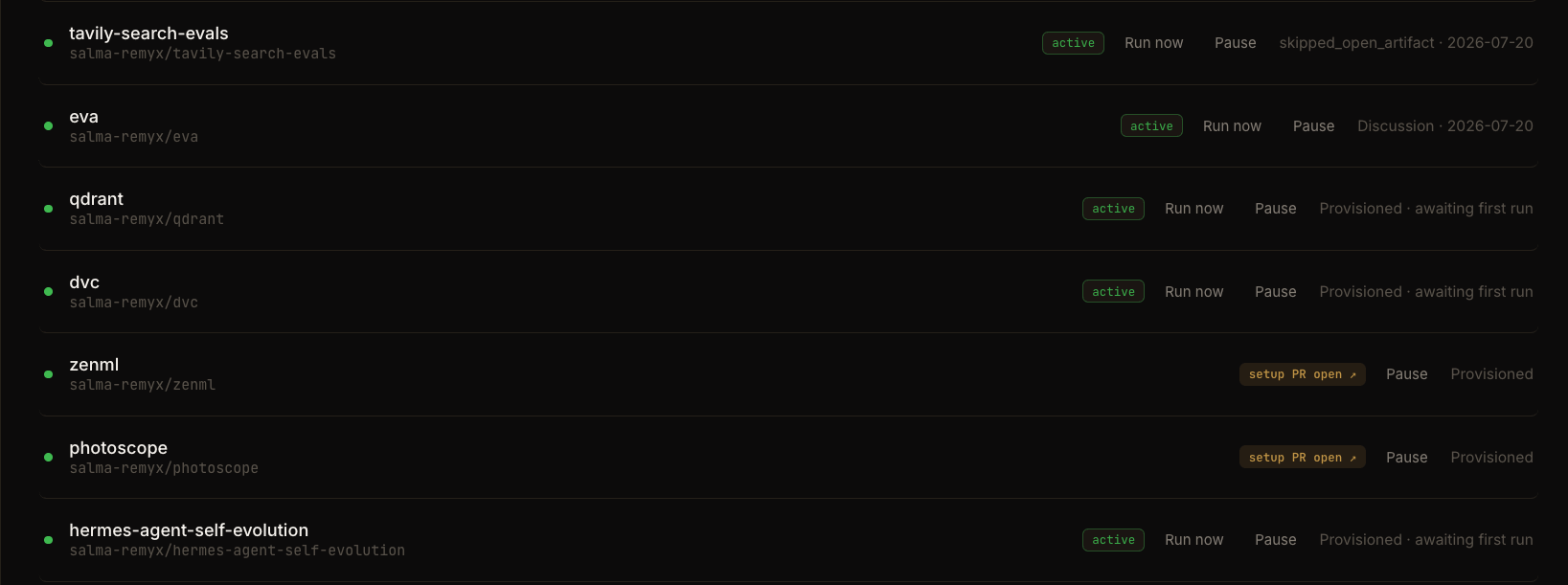
Run now / Pause
- Run now dispatches a one-shot run outside the schedule. Available once the setup PR is merged and the agent isn’t paused.
- Pause revokes the agent’s key: the next run fails auth immediately. The workflow file stays in the repo; nothing else is touched. Resuming is a fresh re-provisioning (new key, new setup PR). Pausing here, revoking the agent key under Account, and the MCP
pause_agenttool all do the same thing.
From the terminal
The agent report
Click an agent to open its report at/agents/<repo>. It leads with a KPI strip and Findings (each finding deep-links into the evidence it came from) over a shared date window (default last 7 days, presets up to All time) that rides the URL, so any view is shareable. Two header buttons: Ask about this agent and Configure. Anything blocking the agent is a banner up front; healthy agents get Run now.
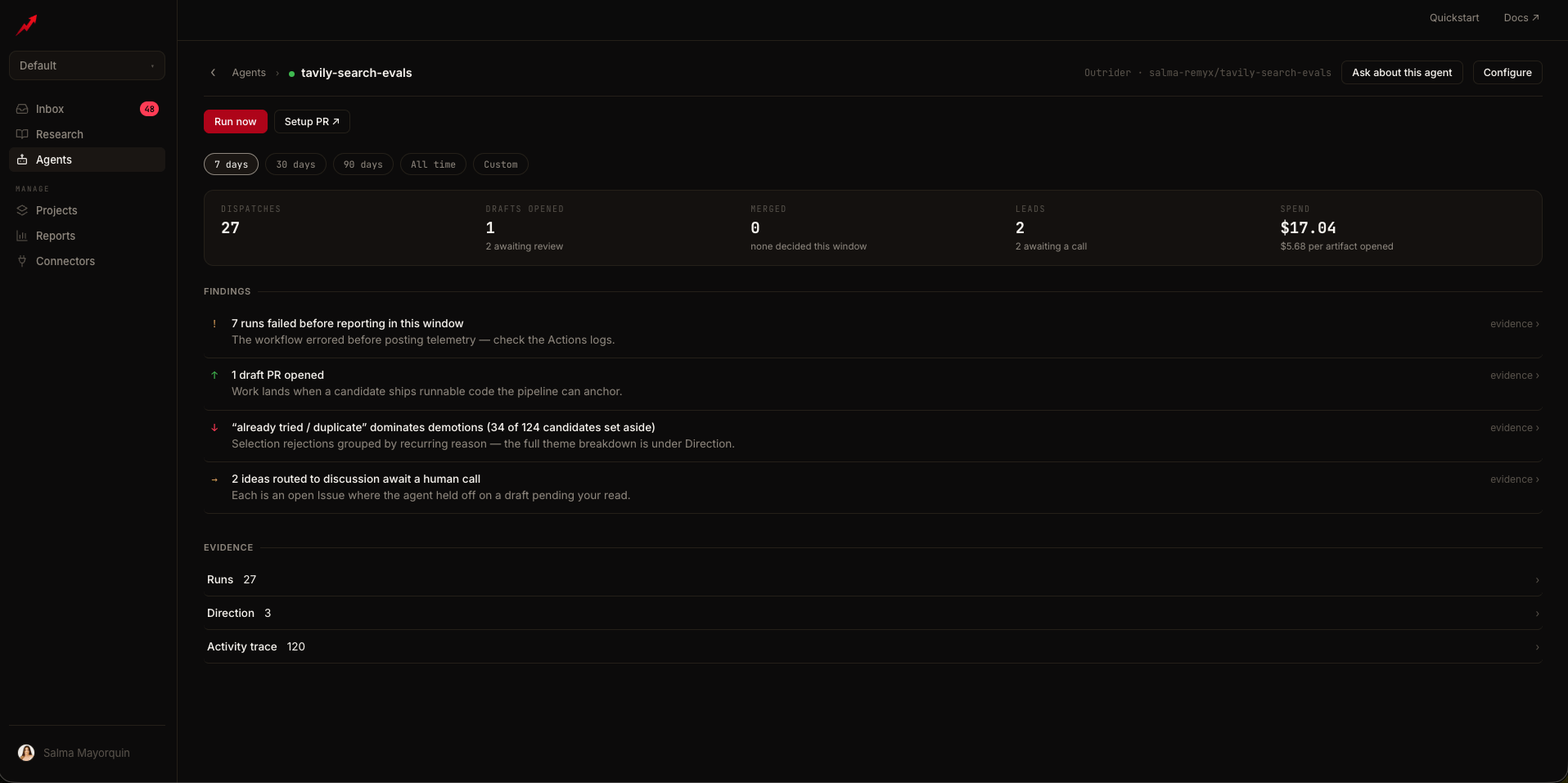
Runs
Every run the agent has reported, in weekly rollups, filterable by outcome and searchable by title, arXiv id, or status:
Each row shows the artifacts, the run’s cost, and an Analyze › action that pulls the run’s job log and returns a root-cause read with a suggested next step.
Direction
What the agent has learned from your decisions. Every merge, skip, and discussion re-weights what it proposes next:
Each direction is evidence-backed: expand it to see the specific PRs, Issues, and runs it was learned from.
Activity trace
The agent’s event stream, grouped by week: Merged, Closed, Drafts, Discussed, Failed runs, Skipped — each event linked to its artifact, with skip reasons attached.Configuration
The agent’s operating setup, editable in place: repository, interest, workflow file, setup PR, coding agent and model backend (changing either re-provisions with a fresh setup PR), and status with Pause / Resume. A single run can override both without re-provisioning, viaremyxai outrider trigger --agent --provider. The Signal panel lists what feeds this agent’s decisions: GitHub merge history (the ranking baseline), the repo’s research brief, validation runs, Linear tickets (interfaces under active work route risky candidates to discussion), and, when connected, A/B ship-rate feedback.
Ask about this agent
A chat drawer grounded in the agent’s real data (runs, telemetry, failing-run log tails, open artifacts, direction) via read-only tools. It explains; actions like triggering or pausing stay behind the app’s confirm-gated buttons. Inbox Ask links land in this same drawer, focused on the relevant run.Where agents surface elsewhere
- The fleet rolls up in Reports; items needing you land in the Inbox.
- An agent can belong to several Projects — link it under the project’s Agents section.
- The full fleet is scriptable via the MCP tool plane and the REST API.
Related
Actions
What actually runs in the repo’s GitHub Actions
Model backends
The coding agent and model backend axes, and the two-tier pattern
Inbox
Where an agent’s drafts and held calls wait for you
Reports
The fleet in one view